Foloup · the installed system

The software that keeps the handoff from breaking.

Foloup connects inquiry follow-up, estimate follow-up, booking, the job and the next visit in one customer record. For auto repair and auto glass shops, start with the follow-up workflow that fits your business. Compatibility, delivery and results are checked in a measured pilot alongside your existing tools.

Running todayDeployed and in daily use, not a prototype
Live operationCanadian automotive service business
Role-scopedOwner, manager and staff see different surfaces
Tenant-isolatedEvery record scoped to one company
Where it acts

Two constrictions. This is what widens each one.

The revenue flow jams in two places: the reply that comes too late, and the estimate nobody chases into a slot that exists. Foloup is not a general-purpose assistant — it is built to hold those two points open.

Inquiries
94
Estimates
43
Booked jobs
17
Lost
77
InflowWhatever your marketing already produces

Foloup does not generate demand. It stops the demand you have from leaking on the way to a booked job.

Constriction 01 — Booking AssistantAnswered when somebody is free

The inquiry waits behind whoever is currently under a car. Phone, inbox and web form are three separate piles.

51 lost here
Constriction 02 — Work Calendar & Follow-upChased when somebody remembers

The estimate goes out and nothing owns what happens next. The calendar cannot confirm the slot the customer wanted.

26 lost here

ReadingThis is not a staffing failure. It is what happens when the phone, the calendar and the follow-up are three systems with a busy person in between.

Stage by stage

Every stage of the revenue flow maps to something already shipped.

This is the difference between a plan and a system. Each stage below names the module that runs it today, and what that module actually does when a customer arrives.

01Acquire
Activity tracking

Call-button presses, campaign visits and link clicks are recorded against a customer, not just a session.

02Capture
Booking Assistant

Constriction 01Inbound SMS, web forms and calls land in one inquiry queue under a single customer identity.

03Convert
Assisted qualification

Answers questions inside the service rules you set per form, and routes anything unusual to a person.

04Schedule
Work Calendar

Constriction 02Checks the request against live technician capacity before a time is confirmed to the customer.

05Operate
Job board

Reserved, vehicle arrived, in progress, completed, paid — one status the whole floor can see.

06Retain
Offers & records

Coupons, memberships and printed certificates tied to the service history that earned them.

07Return
Follow-up engine

Reactivation and reminders drafted for approval, then released on a schedule.

What is inside

Six modules, one customer record.

Foloup is not a bundle of separate tools sharing a login. Every module writes to the same customer, which is why the follow-up knows what the booking knew.

Capture and qualification

Booking Assistant

The part of the shop that answers when nobody can.

  • Inbound SMS, web form submissions and call activity land in one inquiry queue.
  • Replies stay inside the service rules, pricing boundaries and hours defined per booking form.
  • Conversation status moves through handling, quote sent, follow-up and booking complete.
  • Assistance switches itself off the moment a conversation is marked as needing a person.
  • Photo attachments sent by customers are stored on the inquiry.
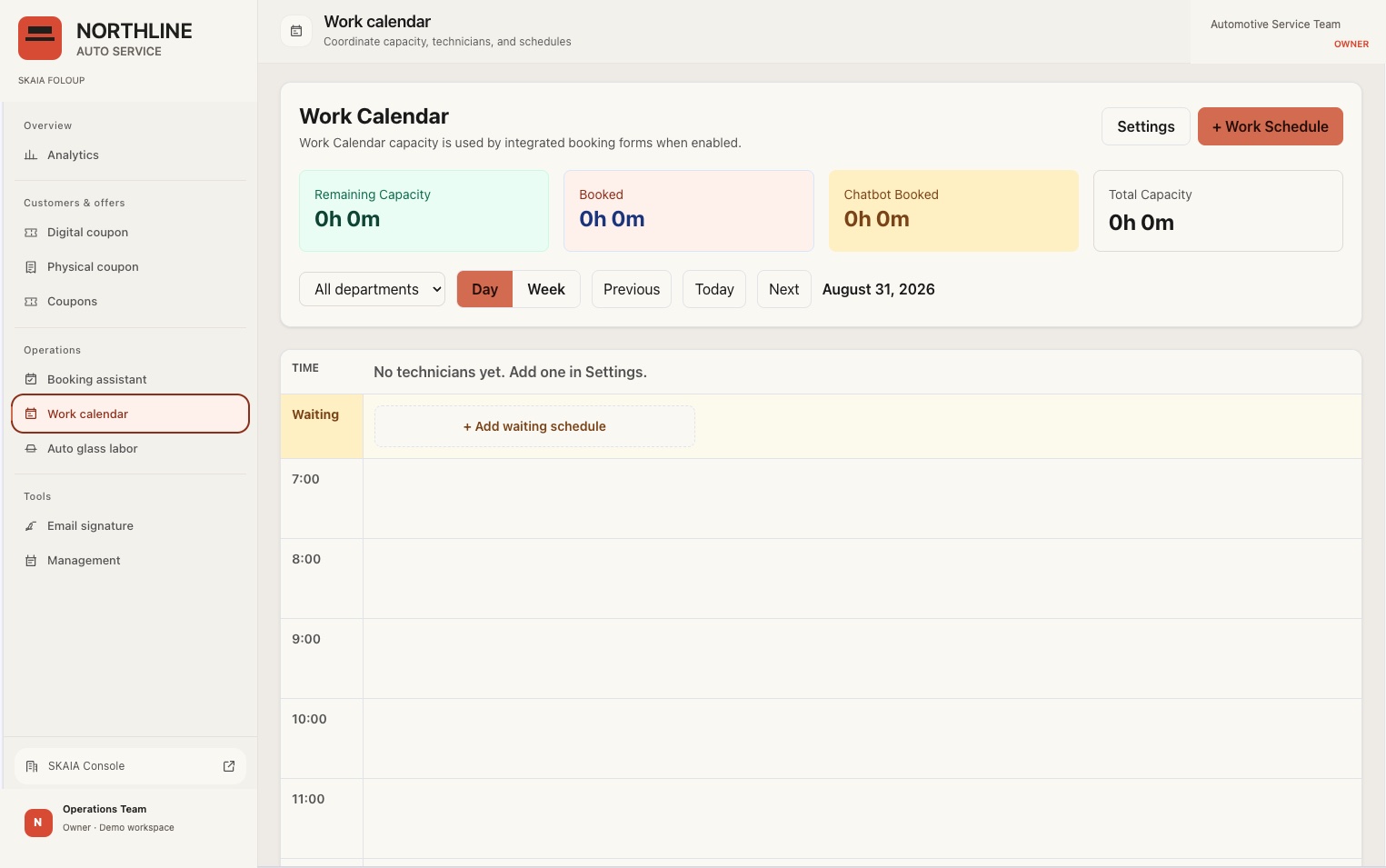
Capacity and scheduling

Work Calendar

Booking against real capacity instead of an empty grid.

  • Technicians carry capacity in minutes per weekday; services carry a duration.
  • Remaining capacity is total capacity minus booked minutes, per department, per day.
  • Day view lays out an hour grid against technician columns, with a waiting lane for unassigned work.
  • Week view shows five days with utilization bars.
  • Holidays and capacity overrides apply company-wide or to one department.
Foloup work calendar showing technician columns and scheduled jobs, with demo branding
Identity and history

Customer record

One person, one record, however they reached you.

  • Identity is keyed on a normalized phone number or a lowercased email, so the same customer does not fork across channels.
  • First visit, last visit, visit count, bookings and applications sit on one record.
  • Customers group into categories that drive who receives which offer.
  • Bulk import and export by CSV.
Repeat and reactivation

Offers & retention

Offers that know who used them.

  • Digital offers and printed certificates, both tracked to the customer who redeemed them.
  • Personal offers issued to a named customer, separate from the public list.
  • First-come limits with a live remaining count, and time-limited offers with a countdown.
  • Counter staff validate a redemption in one action, which moves it to used and notifies the owner.
The gap most shops lose money in

Follow-up

Nothing goes quiet because a person got busy.

  • SMS and email follow-up drafted with the customer context attached, held for approval before sending.
  • A scheduler releases queued messages, follow-ups and archive actions every minute.
  • Sends, opens and clicks are recorded per recipient, not just per campaign.
Measurement

Analytics & attribution

Which campaign produced a booking, not which produced a click.

  • Call clicks, page visits, email opens and clicks, and redemptions all attach to the same customer record.
  • Campaign performance is read against booked and completed work.
  • Activity is queryable by customer, by category and by period.
Control

Trustworthy autonomy, not blind automation.

An assistant talking to your customers without limits is a liability, not a feature. Foloup is built so the boundary is explicit and the record is reviewable.

Bounded actions

The assistant operates only inside the services, hours, pricing boundaries and permissions your team defined. It cannot invent a policy.

Context, not guesswork

Customer history and the live conversation travel together through every handoff, so the next person does not restart the conversation.

Reviewable history

Status, assignment and outstanding follow-up stay visible to whoever is accountable for the number.

Who sees what
Owner

Analytics, offers, pricing, company members and integrations.

Manager

Everything operational — customers, offers, calendar, inquiries — without company administration.

Staff

The counter surface: validation, inquiries, the calendar and the day in front of them.

How it sits in your shop

It connects to what you run. It replaces almost none of it.

Most operators have already bought enough software. The constraint is rarely another tool — it is that the tools do not hand work to each other.

Connects to

  • An SMS number for inbound and outbound customer messaging
  • Your business email for confirmations and follow-up
  • Your existing booking forms and service definitions
  • Traffic from search, ads and your business profile

Does not replace

  • Your website — it stays where it is
  • Your accounting or point of sale
  • Your team — the assistant hands work to people, it does not remove them
  • Your phone system — calls stay on it, they are only recorded against the customer
Activation

What installing it actually involves.

Configuration is done with your team, against your real services and your real capacity. Nothing is switched on for customers until both paths have been tested.

01

Company and services

Branding, service list, durations, departments and technician capacity.

02

Booking forms and limits

What the assistant may answer, what it must escalate, and which calendar each form books against.

03

Channels

SMS number and sender email connected and tested end to end.

04

Customer history

Existing customer list imported and de-duplicated onto single identities.

05

Both paths tested

The customer path and the staff path are run through before anything goes live.

Foloup is not sold on its own.

Software alone does not close a revenue gap — installing it against the wrong bottleneck just adds a login. Foloup is installed as part of a measured engagement: one workflow, one baseline, thirty days, then a continue-or-stop decision on real numbers.

Get a free check-up
Pricing · CAD

Monthly plans and a measured pilot.

Monthly plans are billed per organization. Setup and optional services are separate; confirm deployment scope and charges before purchase.

Foloup monthly subscriptions
PlanPrice
Starter$297/mo
Growth$597/mo
Pro$897/mo
EnterpriseCustom

30-Day Design Partner Pilot: $1,500 CAD. Diagnose one revenue gap, install one workflow, and measure it for 30 days.

Full pricing, activation costs and usage limits →